Everything at a Glance: The Comprehensive Guide to Google for Jobs
In this in-depth article, we’ll dive deep into the world of Google for Jobs.
- Everything at a Glance: The Comprehensive Guide to Google for Jobs
- What is Google for Jobs, and how does it work?
- How do I get listed on Google for Jobs?
- How does Google for Jobs work?
- Recruiting with Google for Jobs
- Google for Jobs for Small Business
- Use of Google for Jobs in Small and Medium-Sized Businesses and Large Corporations
- How Do My Job Listings Get on Google for Jobs?
- Option 1: If you post on job boards
- Option 2: Post Directly on Your Own Career Page
- Option 3: Through specialized service providers such as SEO for Jobs
- How do I rank at the top?
- Here are 7 tips that can help you successfully post your job listings on Google for Jobs:
- What does this mean for you as an employer?
- How can I achieve a higher ranking for my job postings in Google search results?
- Frequently Asked Questions About Google for Jobs
- How much does Google for Jobs cost?
- Google for Jobs and the WordPress Plugin
- Can I use Google for Jobs even without my own website?
- Does my website need to be optimized for Google for Jobs?
- To what extent are the job postings on the careers page synchronized with the information in Google for Jobs?
- Guide: Setting Up Google for Jobs Step by Step
- SEO for Jobs: Your Partner for Sustainable Recruiting Success
- Google for Jobs: High-Potential Job Search or Threat to the Market?
- How it works in detail: From the SERP to the Jobbox
- Anatomy of a Job Listing & The Role of SEO for Jobs
- Benefits for Job Seekers at a Glance
- Future Outlook and International Trends
- Conclusion
What is Google for Jobs, and how does it work?
“Google is determined to crack the code for matching available jobs with the right candidates,” said CEO Sundar Pichai during his keynote address at Google’s annual I/O conference for software developers. With these words, he summed up the mission of Google for Jobs, an innovative platform that aims to revolutionize the job search.
Google for Jobs was developed by Google to connect job seekers and employers in a smart and effective way. The platform is currently available in various countries, including Germany since 2019.
According to Google, in 2022, over 1.5 billion people worldwide used Google for Jobs to look for a new job. This represents about a quarter of the global working-age population.
Google for Jobs is designed to make the job search more efficient and user-friendly. Tired of endlessly scrolling through hundreds of job listings? The platform offers a range of features that make life easier for users. Using Google for Jobs is straightforward and comprehensive for job seekers. No prior knowledge or registration is required.
Google for Jobs isn’t just a job search engine—it has evolved into a one-stop shop for job seekers and employers. For employers, this means an excellent opportunity to directly promote open positions to potential qualified candidates.
In this article, we’ll cover everything from basic functionality to advanced recruiting strategies to ensure you can get the most out of Google for Jobs.

How do I get listed on Google for Jobs?
Just a Few Steps to Get Started
1. Open your preferred web browser.
2. Type “Jobs near me” into the search bar and press the “Enter” key.
3. The Google for Jobs search results will appear. You can also access “Google for Jobs” directly from the Google search page.
4. Browse the available job listings based on relevant criteria such as position, location, and company.
Google for Jobs is integrated into Google’s standard search function. The results are typically displayed even before the organic search results. This makes Google for Jobs very prominent and impossible to miss.
Google displays only a small selection of three job listings on the search results page. Clicking “Job Listings” opens a new view that showcases the full potential of Google for Jobs.

How does Google for Jobs work?
Google analyzes all search queries and identifies the searcher’s intent. If the algorithm determines that the query is a job search, job listings are displayed on the search results page.
Google for Jobs works by crawling websites and job listings to display relevant job openings on the Google search platform. Here are the basic steps of the process:
Google for Jobs Crawler: Google continuously scans the internet for new and updated job listings. This is done using special algorithms and bots that scan websites for relevant job-related information.
Indexing the Information: The collected information is stored in an index that contains relevant details about the job listings, such as job title, location, requirements, and posting date.
Displaying in Search Results: When a user performs a job search on Google, the relevant search results are displayed on the Google for Jobs platform.

Recruiting with Google for Jobs
And that brings us to the topic of recruiting and how Google for Jobs impacts the recruitment process. Recruiting can be time-consuming and costly, but with Google for Jobs, you can make the process more efficient and cost-effective. This platform offers companies numerous benefits, including:
Increased visibility:
The integration of Google for Jobs into Google Search significantly increases the visibility of job postings.
MoreEfficient Application Process:
Google for Jobs makes it easier for applicants to find suitable jobs, resulting in qualified applications.
Targeted candidate search:
By using relevant keywords in job postings, companies can successfully reach qualified applicants who are specifically searching for job openings containing those keywords.
Precise matching through a deep understanding of applicants:
Google enables a more precise understanding of applicants by carefully analyzing their search queries and preferences. This allows for more precise matching between job openings and applicants.
Google for Jobs for Small Business
Stateal search: Google for Jobs allows companies to target their job postings to specific regions, which is particularly important for small businesses with a local focus.
All jobs have an equal chance: On Google for Jobs, all job postings have an equal chance of being found, regardless of company size. This means that small businesses can attract just as much attention with their job postings as large companies.
Cost Savings: Using Google for Jobs can reduce reliance on expensive job portals. The platform offers a cost-effective way to present job listings to a large target audience.
Modern image: Small businesses benefit from the modern and user-friendly presentation of their job postings on Google for Jobs.

Use of Google for Jobs in Small and Medium-Sized Businesses and Large Corporations
Expanded Reach: Google for Jobs enables large and medium-sized companies to present their job postings to a larger audience, as they can filter by factors such as industry and professional experience in addition to regional search criteria.
Efficient Application Management: Google for Jobs’ automated tools enable efficient management of applications, including automatic capture of applications, filtering by criteria, and scheduling of interviews.
Global Talent Search: Google for Jobs enables companies to post their job listings internationally to find qualified talent from around the world.
Higher Quality: The advanced filtering and search features help applicants find relevant job postings more quickly, which can improve the quality of applications.

Disadvantages
Google for Jobs also has some disadvantages, including:
High competition: This is a popular platform where many companies post their job listings. This means companies face a lot of competition when it comes to getting their job listings noticed.
Dependence on the algorithm: Reliance on Google’s algorithms means that companies have little control over the placement of their ads—more specifically, they must be optimized specifically for Google (in terms of content).
Loss of control with a large volume: When there are a large number of job postings, it can be challenging to maintain an overview and control over the listings on Google for Jobs.
Technical effort: Setting up Google for Jobs typically requires adjustments and programming on your website.
Leading job boards such as Monster, Xing, LinkedIn, and Stepstone have expressed their concerns about the dominant position of Google for Jobs in a letter to the EU Commissioner for Competition. They expressed concern that Google for Jobs’ market power could significantly restrict competition in the online job placement sector if competition or regulatory authorities do not take measures to control the implementation of Google’s strategy. [Source: Wikipedia]
But fortunately, there’s also a smart alternative. Here at SEO for Jobs, we’ve specialized in this area since the launch of Google for Jobs and have developed a service that makes it easy to post job listings on Google for Jobs without any website modifications. You don’t need any programming skills—we optimize your job postings for maximum visibility and ensure that the right candidates notice your open positions.
Learn more here about our services for small, medium, and large businesses.
How Do My Job Listings Get on Google for Jobs?
There are three ways to help your ideal candidates find your job posting on Google for Jobs:
Option 1: If you post on job boards
You can post your job listings on a job board—such as Stepstone, Indeed, or Monster—that partners with Google for Jobs. You can find a list of these job boards on Google’s website. Google for Jobs regularly crawls these job boards and lists the job openings in its search results.
Disadvantages:
Hidden link: Applicants land on the job board, not on your careers page.
Additional costs: Depending on the job board, there may be high costs associated with posting job listings.
It is often more cost-effective to post and manage job listings directly on Google for Jobs than on traditional job boards. The reason for this is that there are no fees for posting or editing job listings, whereas many job boards charge high fees. This can lead to significant savings, especially for mass hiring.
Furthermore, Google for Jobs has a wider reach than most job boards, so your job postings are more likely to be seen by qualified candidates, who will then land on your careers page.
Option 2: Post Directly on Your Own Career Page
The second option would be to create a job posting directly in Google for Jobs. You can create your job postings using structured data. This data includes information such as the job title, requirements, and location. Google for Jobs can use this data to find and rank your job postings in its results.
Your job postings appear directly in Google search results; there are no fees for publishing or editing job postings, and applicants are directed straight to your website. At the end of this article, you’ll find detailed instructions on how to set up Google for Jobs yourself.

Disadvantages:
Technical integration: You must connect your website to Google for Jobs.
Self-initiative: You’re responsible for integrating and optimizing your job postings yourself, which can be a challenge without technical expertise.
Many companies use an applicant tracking system (ATS), which is also used to maintain the career portal on the company’s website.
SEO for Jobs is the ideal complement to your applicant tracking system, allowing you to publish your job postings directly and automatically on Google for Jobs.
Option 3: Through specialized service providers such as SEO for Jobs
Maintaining and optimizing job postings for Google for Jobs requires ongoing attention and resources.
To be listed on Google for Jobs, job postings must meet certain criteria. These are based on structured data that must be provided to Google. Even if the basic requirements are met, there are still many factors that can influence how well the job posting is displayed.
SEO for Jobs offers you the technical expertise needed to properly optimize job postings for Google for Jobs. We also continuously monitor the entire process and adapt the job postings to current trends.
Common Problems:
Outdated job postings: Filled positions are still searchable, while new job openings are missing.
Missing or Inadequate Logo: The logo is missing or not optimized for small display sizes.
Missing information: Important details such as address, employment type, or salary are missing.
Poor formatting: The job posting is cluttered and difficult to read.
Incorrect link: The job posting is not correctly linked to the company’s website.
Inappropriate "Apply" button label: The label is unclear and ambiguous.
Technical challenges:
Optimizing job postings for Google Jobs typically requires extensive technical modifications to the applicant tracking system (ATS). This often involves high costs, especially if the ATS is operated by an external service provider.
Solution:
With our tool, you can make your BMS Google Jobs-ready without having to make any changes to your website.
Benefits:
Quick and easy integration
No programming knowledge required
Automatic updates to job postings
Improved visibility on Google Jobs
Increased number of applicants
SEO for Jobs handles the technical integration of Google for Jobs and helps you optimize your job postings so you can reach the right candidates.
How do I rank at the top?
To optimize a job posting for Google for Jobs, there are a few things to keep in mind, as you need to optimize for both the Google algorithm and job seekers.
Here are 7 tips that can help you successfully post your job listings on Google for Jobs:
1. Use clear, precise job titles and avoid internal jargon
The title of a job posting is the most important factor in search results.
To stand out from the competition on traditional job portals like Xing or Stepstone, many companies rely on creative job postings. If you’re looking for someone to help behind the counter at your café, it’s better to label the position “Barista” rather than “Coffee Lover” to reach qualified applicants.
On Google for Jobs, however, the ranking mechanisms work differently than on job boards. Google’s ranking is based on content quality. To increase your ad’s visibility, it’s therefore important to include the specific job title in the ad title. This makes it easier for Google to find and categorize the ad.
The title should be 35–50 characters long
Do not include gender-neutral language in the title
You can find more tips on how to optimize your job title in our tool
2. SEO Optimization for Job Postings
Identify relevant keywords and incorporate them naturally into your job postings (title, descriptions, responsibilities). Use long-tail keywords for greater precision.
Example: Instead of “Marketing Manager,” use “Online Marketing Manager for an E-Commerce Startup.”
3. Make sure the descriptions are complete and include important information such as location, requirements, and benefits
You may have already noticed: When searching for job listings on Google, you’ll typically see jobs in your area first. If you live in Hamburg and search for a “project management job” on Google, you’ll usually see positions in Hamburg and the surrounding area first.
Google detects the location from which you’re searching and prioritizes search results accordingly . This ensures that you see the job listings that are most relevant to you.
What does this mean for you as an employer?
If you want to advertise job openings in a specific region, you should take this into account when creating your job posting. Here are a few tips:
Include the location in the job title and job description.
Include the work location address.
Choose relevant keywords related to the location.
However, if the position can also be performed remotely, you can, of course, specify this instead of a specific location.
4. One Location Per Job Posting
As mentioned earlier, the regional focus of your job postings plays an important role. If your company has openings at multiple locations, you should post them separately. If you’re looking for an “SEO expert” in Berlin and Munich, create two separate job postings: one with Berlin as the location, and one for Munich.
5. Focus on Employer Branding.
It makes you a trustworthy employer and sets you apart from the competition.
Employer branding helps increase the appeal of your job posting while also improving its visibility in search engines.
Strong Employer Branding also shows potential applicants that you’re a reputable company committed to creating a positive work environment.
Example: In the job posting, you should clearly convey your company’s culture and values and provide insight into the work environment, the team, and opportunities for personal and professional growth.
Use the job posting to strengthen your employer brand and show potential applicants why they should work for your company in particular.
6. Salary Transparency: A Win for Everyone
The launch of Google for Jobs sparked mixed reactions in the HR world. The call for greater salary transparency met with some resistance, as this is a taboo subject in Germany.
Google for Jobs requires that salaries be listed in job postings. This is common practice in other countries; it signals fairness and appreciation toward potential applicants and is viewed positively by Google’s algorithm.
7. Add an appealing logo
Make sure your logo looks professional and appealing in Google for Jobs. Use a square logo ( at least 200 x 200 pixels and no more than 800 x 800 pixels). Other formats will still be displayed, but valuable space will be wasted. Make sure it remains easily recognizable even at a small size. Without a logo, a placeholder with a random color and the first letter of your company name will be generated. Choose a simple, clear logo with high brand recognition. Use high-contrast colors to improve readability.
An optimized logo increases the visibility of your job postings on Google for Jobs and leaves a professional impression on potential applicants.
We’ve prepared a template for the ideal job posting.
How can I achieve a higher ranking for my job postings in Google search results?
Can I create an effective Google Ads campaign?
You can boost your job postings on Google for Jobs. To do this, you can use Google Ads. Google Ads allows you to place your job postings at the top of Google for Jobs search results. However, this incurs additional costs.
If you’re looking for another way to promote your job postings and reach more qualified candidates, you should definitely consider Google for Jobs ads. You can find more information about Google Ads here.

Frequently Asked Questions About Google for Jobs
How much does Google for Jobs cost?
The question “Does Google for Jobs cost anything?” is certainly relevant for companies that want to post their job listings on this platform. Google for Jobs is a free service. Companies can post their job listings on the platform at no direct cost. As mentioned earlier, optimizing your job listings for Google for Jobs is crucial to maximizing the visibility and reach of your ads.
Google for Jobs and the WordPress Plugin
There are a number of plugins available for WordPress that make it easier to create and publish job postings for Google for Jobs. These plugins often offer additional features, such as the ability to promote or manage job postings.
You can easily embed your job postings into your WordPress website, and Google for Jobs will automatically index them and display them in search results. Here you can learn in detail how WordPress and Google for Jobs can be used together.

Can I use Google for Jobs even without my own website?
Normally, the job posting must be published on a website. However, with the SEO for Jobs solution, it’s also possible to use, for example, a PDF containing the job posting. In that case, you don’t need your own website.
It’s still beneficial to have a dedicated careers page on your website to present comprehensive information about your company and other job openings.
Does my website need to be optimized for Google for Jobs?
If you want to implement Google for Jobs yourself, you’ll need to adapt and reprogram your website.
But there’s also an alternative: use external services like SEO for Jobs.
Since the launch of Google for Jobs, SEO for Jobs has been working intensively on this topic and has developed a service that makes it very easy to post job listings on Google for Jobs without having to make any changes to your website .
To what extent are the job postings on the careers page synchronized with the information in Google for Jobs?
Manually updating your job postings across all relevant platforms can be time-consuming and tedious. With our custom job crawler, we take this task off your hands—so your job postings are automatically published, updated, or deactivated. Since the quality of job postings is our top priority, all crawled postings undergo manual quality assurance to ensure optimal formatting.
In the Business and Enterprise plans, the automatic import feature can be added directly—for smaller plans, please feel free to contact us.
Guide: Setting Up Google for Jobs Step by Step
Understanding Google for Jobs: Job Search as an Extension of Google Search
To use Google for Jobs effectively, it’s important to understand how it works. At its core, is an extension of the classic Google Search. This means: a familiar search function and integration into Google Search.
Searching for jobs on Google for Jobs works similarly to searching for other content. Simply enter relevant keywords such as job title, industry, or location, and you’ll receive a list of results. Job postings are integrated directly into Google’s search results. This allows you to seamlessly find suitable jobs while conducting your regular search.
Do you want to skip job boards and publish your job listing directly on your website? Then indexing by Google is essential.
How indexing works and more: We’ll guide you step by step through the entire process of setting up Google for Jobs. You can find detailed information in our article.
SEO for Jobs: Your Partner for Sustainable Recruiting Success
In the complex world of Google for Jobs optimization, we at SEO for Jobs step into our role as specialists, demystifying the intricacies so you can focus on what you do best— finding the right talent.
As specialists in Google for Jobs optimization, we at SEO for Jobs understand the complex dynamics of this platform. Our state-of-the-art software ensures flawless results without disrupting your existing system and seamlessly integrates with your current applicant tracking system.
SEO for Jobs operates discreetly in the background, acting as an automated intermediary between your career portal and Google for Jobs. With direct interfaces to Google and the expertise gained from thousands of successfully listed positions, we are the leading German provider that enables manual job postings on Google for Jobs without requiring structured data. On this page, you can learn more about the features we offer.
Managing job postings across different platforms can be a challenge, but don’t worry. Our custom job crawler automatically posts, updates, or deactivates jobs to ensure they remain up to date. In accordance with the highest standards, every crawled position undergoes a thorough manual quality assurance process to ensure optimal formatting.
Discover the solutions that best fit your needs by visiting our pricing page and selecting the right plan for you.
Optimize your recruiting strategy with SEO for Jobs—your trusted partner for small, medium, and large businesses. We empower you to unlock the full potential of Google for Jobs and keep you up to date on the latest developments in the recruiting industry .
Google for Jobs: High-Potential Job Search or Threat to the Market?
The job market is changing, and the field of online recruiting holds enormous financial potential: in Germany alone, the market is estimated at just under 2 billion euros. Studies (such as a Forsa survey) show that one in three employees is willing to switch employers if they receive a better offer. Companies must therefore invest heavily in Employer Branding and talent marketing. Over 77% use online job postings for this purpose, while 63% rely on social media.
It is precisely in this highly competitive market that the search engine giant has entered the fray with Google for Jobs. While established job boards like Stepstone, Monster, and Indeed, as well as professional networks like LinkedIn and XING, battle for dominance with expensive advertising campaigns, Google is breaking the old rules of the market.
What makes Google for Jobs so innovative?
Unlike traditional job portals, Google for Jobs isn’t a standalone platform where you have to register or pay for placements. It’s a technology integrated directly into the regular Google search.
The Focus on the Company’s Website
Traditional job boards often suffer from outdated job postings because keeping the data up to date is too time-consuming. Companies typically focus primarily on their own career pages. This is exactly where Google comes in: The algorithm prioritizes the original sources—that is, the employers’ own websites.
The End of the Middleman
Google’s long-term goal is to direct job seekers straight to the source and make job boards redundant as an intermediate step. In about 92% of all cases, Google delivers a relevant result for a given search query and places it prominently at the very top of the first search results page. This consistently pushes the organic search results from traditional job boards further down the page.
How it works in detail: From the SERP to the Jobbox
Since about 75% of all job seekers start their job search directly on Google, the tool meets users exactly where they already are.
1. Getting Started: The Google Job Box
When a user enters a search query clearly related to a job (e.g., “medical assistant job Hamburg”), Google recognizes the intent. On the search results page (SERP), the so-called Google Job Box appears—identifiable by a blue label that reads “Job Listings” (often supplemented by “near…”).
This box serves as a preview and displays the first three relevant jobs along with limited filters.
Sometimes a banner featuring partner job boards appears above it.
Clicking on the box opens the actual, full-featured search interface of Google for Jobs.
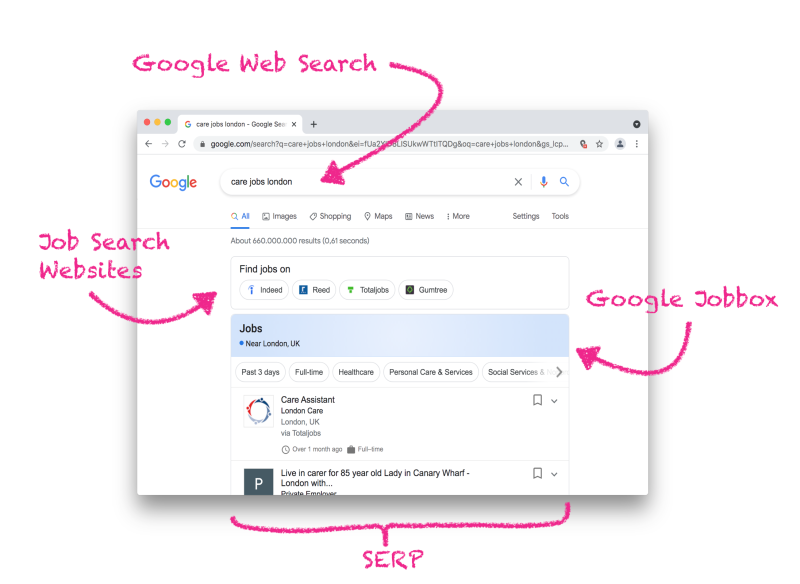 The Google Jobbox is the gateway to Google for Jobs and appears on the SEPR page.
2. The Google for Jobs User Interface
The full view is divided into four main sections:
Free-text search: Here, you can flexibly search for terms. Google automatically determines the user’s location based on their IP address (e.g., region detection), but you can also enter locations manually.
 You can easily search for job listings on Google for Jobs using a free-text search.
Filter system: Results can be dynamically filtered by:
Location/Radius: A flexible radius around specific cities.
Posting Date: Filter by recency for better chances of getting hired.
Employment Type: Quick selection between full-time, part-time, or internship.
Employer: Targeted search for preferred companies.
 Using the
The job list (on the left): A clear list of all matching jobs with basic information (company name, logo, location, source, age of the posting, salary, and employment type). As you scroll down, additional jobs are automatically loaded.
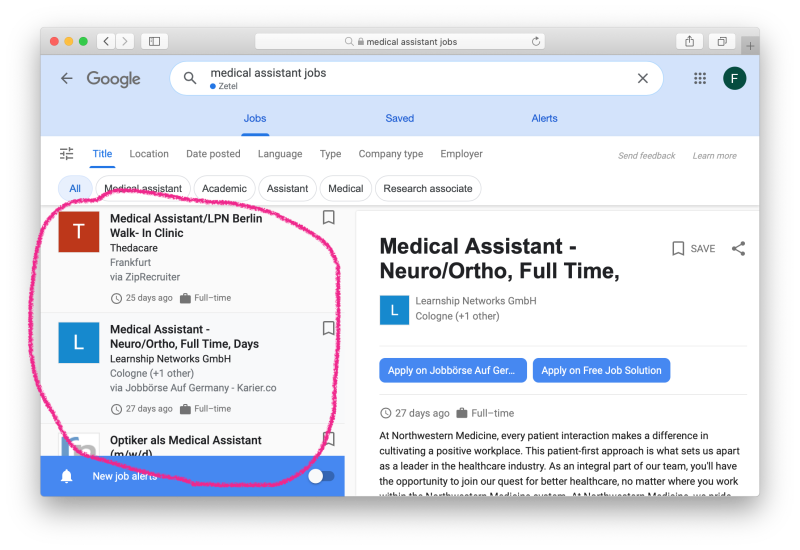 The Google for Jobs results list shows all search results.
The job details page (right): Clicking on a job opens all the details directly on Google—the user doesn’t have to leave the page just yet.
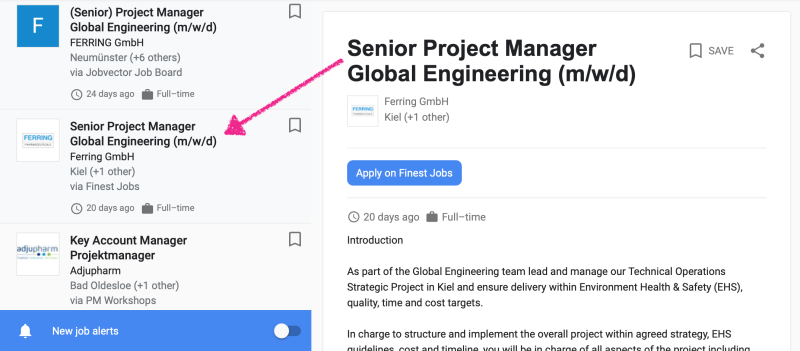 Die Google for Jobs Details Page enthält sämtliche Informationen zu einem Stellenangebot.
Anatomy of a Job Listing & The Role of SEO for Jobs
Everything comes together on the details page. Since Google wants to enforce a uniform design to ensure comparability, visual embellishments or elaborate graphics are omitted. The listing consists of the following elements:
Title & Company: The headline should be short and concise so it isn’t cut off in the preview.
Company Logo: The only visual element that sets the listing apart. Since it’s displayed very small, a simplified version is recommended (e.g., the favicon without text). If no logo is provided, Google generates a colorful placeholder with the company’s first initial.
Apply Button: This eye-catching blue button takes the user to the application page with a single click (e.g., a PDF, a form, or the company website). If Google has found the ad on multiple platforms, several buttons will appear here, each labeled with the respective source (e.g., “Apply on: LinkedIn”).
Job Description: A simple block of text. Google allows almost no formatting here except for paragraphs and bullet points.
Additional Features (AI-powered):
Reviews: If available, Google automatically links to employer review sites.
Map: If the address is correct, a map is displayed showing the distance and travel time (based on the user’s Google account).
The Technical Challenge for Employers
For Google to even find and index a job posting, specific technical requirements (structured data in the source code) must be met on the company’s website. Since many companies are unable to implement this on their own, they turn to specialized service providers such as SEO for Jobs. This service allows them to manage job postings via an editor and optimize them for Google without having to make changes to their own website.
Benefits for Job Seekers at a Glance
Centralization: No need to sign up for countless job portals; no tedious searching across different platforms.
Smart Suggestions: By analyzing search behavior, Google also suggests jobs that weren’t explicitly searched for but match the applicant’s profile.
Free & Convenient: The service is free for job seekers. Anyone with a Google account can also save jobs or set up a Google Alert to receive notifications about new job postings.
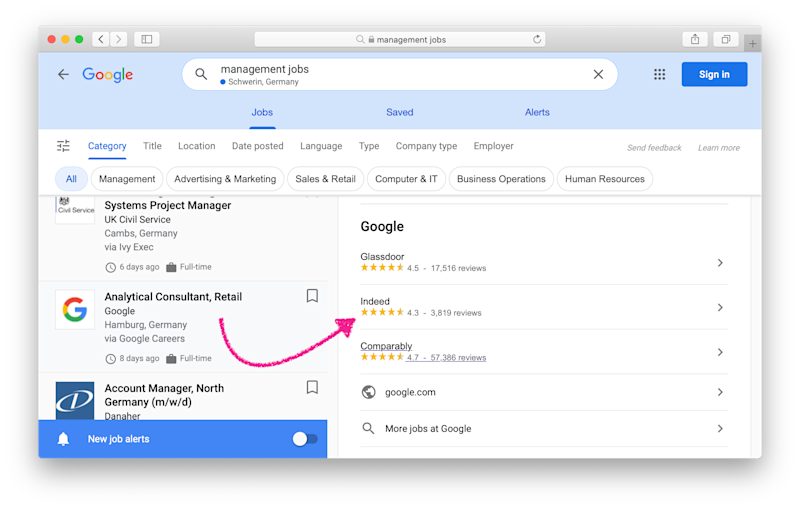 Google Jobs displays reviews for many employers. This helps with the selection process.
Future Outlook and International Trends
Google for Jobs is available in the majority of countries worldwide. New features are traditionally tested and rolled out first in the English-speaking market (U.S./U.K.). The focus is on two groundbreaking features:
Job Highlights: Google’s AI automatically filters the most important qualifications and responsibilities from the body text and displays them as clear bullet points directly below the job title. This makes scanning job postings even faster.
Salary Comparisons: A directly integrated tool that makes salary structures more transparent.
Conclusion
For job seekers, Google offers tremendous added value through a simplified, fast, and transparent search experience. For companies, having a presence on Google for Jobs is becoming vital to survival, as firms not listed there will hardly be found by talent in the future. For traditional job boards, however, the tool poses a serious existential threat: they are losing visibility and reach and are increasingly being relegated by Google to the role of mere data providers.
More articles …